How to test IE9 if you run Windows XP 12
Edit 2012-01-05
A couple of weeks ago Microsoft finally released Internet Explorer Application Compatibility VPC Images for IE9.
Because of this, the below procedure is not necessary anymore.
There's one quite strange thing with these images. The Win7+IE8 image is about 2.6GB but the Win7+IE9 is 4.3GB! There's some extra tools in the IE9 one but they certainly do not add up to the 1.7GB size difference. I've had reports of people successfully downloading the Win7+IE8 and then upgrading to IE9. That could be an option if you want to save some download time and disk space.
I'm currently at a company still running Windows XP. Last week Internet Explorer 9 was released and it requires at least Windows Vista. That requirement was a problem because we absolutely had to test our web applications in IE9. Microsoft had released Internet Explorer Application Compatibility VPC Images for earlier versions of IE but not for IE9. At least they still offer a VPC running Vista and that was the path we took to solve our testing problems. If you know of an easier way then please tell!
- Download and install Virtual PC.
Edit 2011-09-25 It seems Microsoft has changed the download page. You can get Virtual PC 2007 for older versions of Windows here. - Download and run/unpack the IE8-VIS VHD.
- Create a new virtual machine and select the VHD as the harddisk.
- In the virtual machine then download and install Vista SP2.
- Finally, obviously still in the VPC, download IE9.
Lazy evaluation is no friend of mutable state 1
A couple of days ago I accidentally landed on a page about implementing merge sort in C#. I thought it would be a nice exercise to try to implement that as a generic method and so I did.
I also wanted to learn more about the characteristics of IEnumerable so I used IEnumerable<T> instead of List<T>. That choice got me in trouble and I opted for help on Stack Overflow.
People said it was sorting correctly but Jon Skeet also asked if I tested it correctly and that I did not. I digged deeper into the problem and extended the question on SO. I had a hunch that it was the mutable state of List<T> and the lazy evaluation of IEnumerable that was the problem but I couldn't quite figure out how.
Along came Kobi and his answer finally made me understand why a .Sort() of the list messed up the result of my sorting.
I then changed the implementation to be fully lazy evaluated and now it looks like this.
1 2 3 4 5 6 7 8 9 10 11 12 13 14 15 16 17 18 19 20 21 22 23 24 25 26 27 28 29 30 31 32 33 |
public class MergeSort<T>
{
    public IEnumerable<T> Sort(IEnumerable<T> arr)
    {
        if (arr.Count() <= 1) return arr;

        int middle = arr.Count() / 2;
        var left = arr.Take(middle);
        var right = arr.Skip(middle);
        return Merge(Sort(left), Sort(right));
    }

    private static IEnumerable<T> Merge(IEnumerable<T> left, IEnumerable<T> right)
    {
        IEnumerable<T> arrSorted = Enumerable.Empty<T>();

        while (left.Count() > 0 && right.Count() > 0)
        {
            if (Comparer<T>.Default.Compare(left.First(), right.First()) < 0)
            {
                arrSorted=arrSorted.Concat(left.Take(1));
                left = left.Skip(1);
            }
            else
            {
                arrSorted=arrSorted.Concat(right.Take(1));
                right = right.Skip(1);
            }
        }

        return arrSorted.Concat(left).Concat(right);
    }
} |
Please be aware that this is but an exercise and not very efficient.
Now to the problems that you can encounter with the above and an explanation to the title of the post. Let's MergeSort a simple List<int> followed by a call to the built-in .Sort() on List<T>.
1 2 3 4 5 6 |
var ints = new List<int> { 2, 3, 1 }; var mergeSortInt = new MergeSort<int>(); var sortedInts = mergeSortInt.Sort(ints); // sortedInts.ToList() is {1, 2, 3} ints.Sort(); // sortedInts.ToList() is {3, 1, 2} |
So what's going on here? As far as I can tell it's something like this. sortedInts isn't evaluated until the first call to MoveNext() (or Tolist() or any of those). Before that it only has lazy pointers to the original enumerable values. ints.Sort() messes up the beauty of lazy evaluation by changing the underlying data structure. It can do that because List<T> is mutable (writeable).
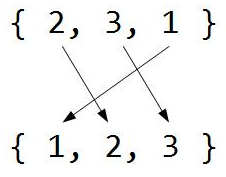
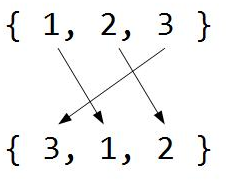
But why {3, 1, 2} after ints.Sort()? The original sequence was { 2, 3, 1} and that is what the MergeSort sorted, not by creating a new sequence but only by lazy pointers.
At first the MergeSort sorts like this
but after the source list has been sorted/changed it will do this
What can you do to stop this to happening to you? The boring way is to never use lazy evaluation but that is kind of hard if you happen to use LINQ (and you should, it's great). Another way is to use immutable data structures and that is how functional languages tackles this problem. In C# we have the ReadOnlyCollectionSort() method.
A nice feature of the MergeSort above is that it has no problems with an immutable collection.
1 2 3 4 5 |
var rints = new ReadOnlyCollection<int>(ints); var sortedRints = mergeSortInt.Sort(rints); // sortedRints.ToList() is {1, 2, 3} ints.Sort(); // sortedRints.ToList() is {3, 1, 2} |
What?! How could an immutable collection get messed up like this? It turns out that ReadOnlyCollection<T> is only a facade for mutable collections and that is what bit us here. You have to pass a copy of the list. Example follows.
1 2 3 |
var rints = new ReadOnlyCollection<int>(new List<int>(ints)); var sortedRints = mergeSortInt.Sort(rints); ints.Sort(); |
That also works for List<T>.
1 2 3 4 5 6 |
var ints = new List<int> { 2, 3, 1 }; var mergeSortInt = new MergeSort<int>(); var sortedInts = mergeSortInt.Sort(new List<int>(ints)); // sortedInts.ToList() is {1, 2, 3} ints.Sort(); // sortedInts.ToList() is {1, 2, 3} |
Finally I would like to send a big thank you to Kobi for sorting out my problems with the original solution.
A strict directed graph
Recently N. asked a question on a list that made my geek-senses tingle. He had a test with 12 levels of questions. The testee should answer 10 questions. If a question was answered correctly the level would go up and if it was not correct it would go down. If a level 12 was answered correctly, another level 12 would be asked and vice versa. The first question would be a level 6. N. wanted to know how many questions of each level he needed.
Pretty soon he got a correct answer and several wrong. One of the incorrect answers was, and I don't like to admit this, provided by me. I took the recursive route (which I very seldom do) and then tried to present the result in ASCII. I failed. The result from the algorithm in itself was correct but the presentation was simplified so much it failed to deliver the correct answer. Here it is:
             06
            05 07
          04 06 08
         03 05 07 09
       02 04 06 08 10
      01 03 05 07 09 11
    01 02 04 06 08 10 12
   01 02 03 05 07 09 11 12
 01 02 03 04 06 08 10 11 12
01 02 03 04 05 07 09 10 11 12
The problem is that this result can be read as if the testee could get two level 2 questions in a row but the rules forbids that.
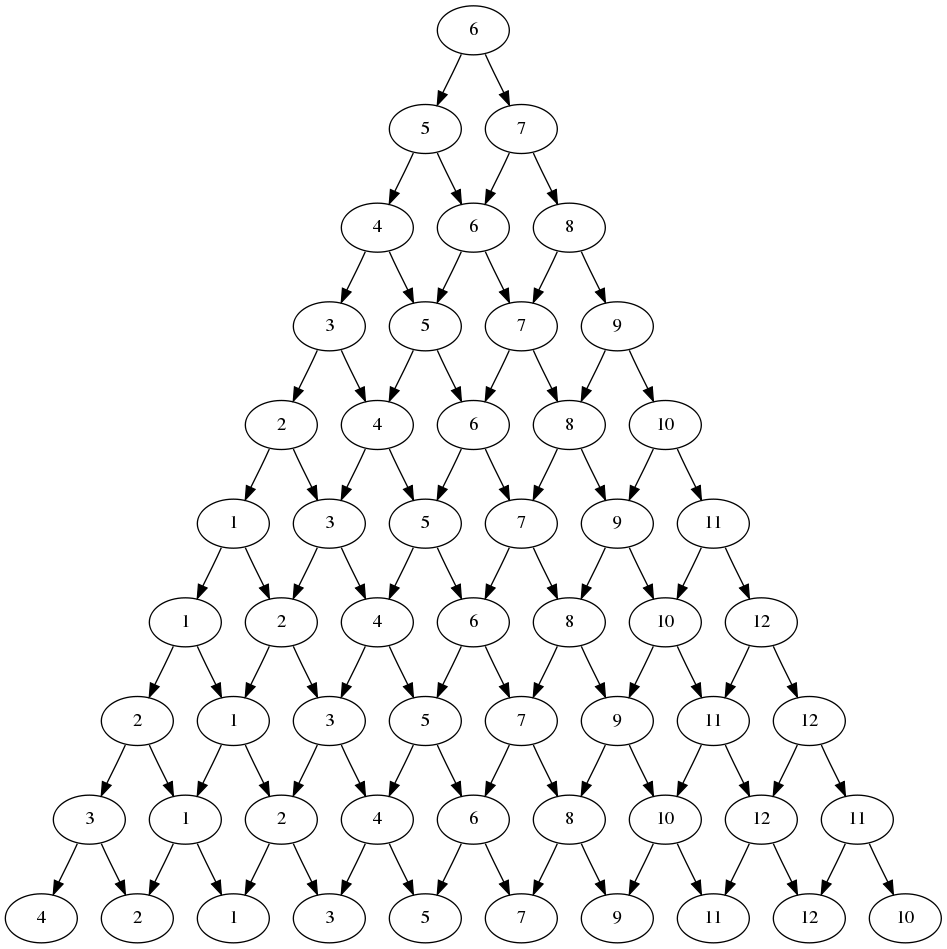
Then I remembered reading about Graphviz and especially Ruby-Graphviz. That's what I used to generate the graph to the right. The graph itself is nothing but a visualization of all the possible question sequences. To find the answer that N. was looking for you can follow a level from top to bottom and count the number of times it can occur. I have to admit that it's far from the most convenient way but it works.
The result
5 of level 1, 5, 6 & 7.
4 of level 3, 4, 8, 9 & 12.
3 of level 2, 10 & 11.
I had to jump a few hurdles to get there. First my old Ubuntu-install, for unknown reasons, had some ancient version of libfreetype in /usr/local/lib/ that I had to remove. In the end an rm /usr/local/lib/libfreetype* would have been good. I also did a sudo ldconfig but I'm not sure that was necessary. Let's just hope you're on a modern system where a sudo apt-get install graphviz followed by sudo gem install ruby-graphviz will be enough.
The recursive code I wrote produces every single path the testee can take. A graph of that would be quite big since it's 1023 nodes. I then found out about strict digraph in the Graphviz DOT language. It sounded like a perfect fit and it was! One problem though, Ruby-Graphviz didn't seem to know about it. The power of open source software let me patch ruby-graphviz-0.9.18/lib/graphviz/constants.rb so that GRAPHTYPE included it
1 2 3 4 |
## Const: graphs type GRAPHTYPE = [ "digraph", "graph", "strict digraph" ] |
Another awesome power of open source is Grégoire Lejeune because only hours after me contacting him he added it to the GitHub repository.
Here's the code that produced the Rooted Binary Directed Acyclic Graph (or is it Rooted Directed Binary Acyclic Graph?).
1 2 3 4 5 6 7 8 9 10 11 12 13 14 15 16 17 18 19 20 21 22 23 24 25 26 27 |
require 'rubygems' require 'graphviz' @min_level=1 @max_level=12 @max_depth=10 start_level=6 @g = GraphViz.new(:G, :type => "strict digraph" ) def add_node(level, depth, parent) if depth<@max_depth current=[level, depth].join(",") sub=level<=>@min_level add=@max_level<=>level add_node(level-sub, depth+1, current) add_node(level+add, depth+1, current) @g.add_node(current).label=level.to_s @g.add_edge(parent, current) unless parent=="00" end end add_node(start_level, 0, "00") @g.output( :png => "graph.png" ) |
With the current parameters this problem might not be the most exciting but I believe that by just modifying them slightly we would, again, reach a wall of complexity.
Encrypt images in JavaScript
In browsers that supports the HTML5 canvas it's possible to read the raw image data. I figured that this makes it possible to encrypt images on the client. Why would one ever want to encrypt images client-side? One use case could be to send images to a server that only those who know the password can decrypt (host-proof hosting).
I used Crypto-JS to encrypt with AES and Rabbit.
First I get the CanvasPixelArray from the ImageData object.
1 2 3 4 |
var ctx = document.getElementById('leif') .getContext('2d'); var imgd = ctx.getImageData(0,0,width,height); var pixelArray = imgd.data; |
The pixel array has four bytes for each pixel as RGBA but Crypto-JS encrypts a string, not an array. At first I used
.join() and .split(",") to get from array to string and back. It was slow and the string got much longer than it had to be. Actually four times longer. To save even more space I decided to discard the alpha channel.
1 2 3 4 5 6 7 8 9 10 |
function canvasArrToString(a) {
  var s="";
  // Removes alpha to save space.
  for (var i=0; i<pix.length; i+=4) {
    s+=(String.fromCharCode(pix[i])
        + String.fromCharCode(pix[i+1])
        + String.fromCharCode(pix[i+2]));
  }
  return s;
} |
That string is what I then encrypt. I sticked to `+=` after reading String Performance an Analysis.
var encrypted = Crypto.Rabbit.encrypt(imageString, password); |
I used a small 160x120 pixels image. With four bytes for each pixels that gives 76800 bytes. Even though I stripped the alpha channel the encrypted image still takes up 124680 bytes, 1.62 times bigger. Using `.join()` it was 384736 bytes, 5 times bigger. One cause for it still being larger than the original image is that Crypto-JS returns a Base64 encoded string and that adds something like 37%.
Before I could write it back to the canvas I had to convert it to an array again.
1 2 3 4 5 6 7 8 9 10 |
function canvasStringToArr(s) {
  var arr=[];
  for (var i=0; i<s.length; i+=3) {
    for (var j=0; j<3; j++) {
      arr.push(s.substring(i+j,i+j+1).charCodeAt());
    }
    arr.push(255); // Hardcodes alpha to 255.
  }
  return arr;
} |
Decryption is simple.
1 2 3 4 |
var arr=canvasStringToArr(
              Crypto.Rabbit.decrypt(encryptedString, password));
imgd.data=arr;
ctx.putImageData(imgd,0,0); |
Tested in Firefox, Google Chrome, WebKit3.1 (Android 2.2), iOS 4.1, and a very recent release of Opera.
| Browser / Action in milliseconds | Enc. Rabbit | Dec. Rabbit | Enc. AES | Dec. AES |
| Google Chrome 6.0.472.62 C2D@1.86GHz | 136 | 130 | 236 | 222 |
| Opera 10.63 P4HT@3GHz | 246 | 252 | 438 | 437 |
| Google Chrome 6.0.472.63 P4HT@3GHz | 280 | 648 | 303 | 547 |
| Firefox 3.6.10 Phenom II X4 945@3GHz | 494 | 321 | 1876 | 1745 |
| Firefox 3.6.10 i5@3,5GHz | 366 | 193 | 1639 | 1410 |
| Firefox 3.6.10 C2D@1.86GHz | 760 | 367 | 2417 | 1983 |
| Firefox 3.6.10 P4HT@3GHz | 880 | 440 | 4000 | 3500 |
| Nokia N900 Chrome | 1764 | 1975 | 2509 | 2508 |
| WebKit 3.1 (HTC Desire) | 2000 | 2200 | 3300 | 3400 |
| iPhone 3GS iOS 4.1 | 2130 | 2071 | 7198 | 7131 |
| N900 Firefox Mobile | 3411 | 3508 | 19308 | 19466 |
| N900 native (MicroB) | 4681 | 4300 | 24560 | 20973 |
| X10 Mini Pro, Android 1.6 | 7464 | 7747 | timeout | timeout |
A demo can be found here.
EDIT 2010-10-17
Warning I've noticed that the encrypted strings aren't compatible between browsers. At least not in between Google Chrome and Firefox. I don't know why.
I also tried to add deflate/inflate and that compresses my test image to a third of the raw size and in Google Chrome it also halved the execution time. In Firefox Rabbit got about 50% slower and AES about 50% faster with deflate/inflate.
Here's a demo of this.
EDIT 2010-10-21
Added a preprocessing filter of the raw image data inspired by PNG type 1 sub filter. Presented my idea to Fredrik and he returned a formula. Thanks!
The result wasn't what I had hoped for, a measly 6% smaller. I also tried to save the image as real PNG and that one is 20480 bytes.
20480*1.37=28057 bytes (Base64 overhead) and my homemade format is 38336 bytes. Not a fantastic result but not that horrible either.
Here's a demo of this.
To hack a Superpower 1
I was interviewed in a swedish documentary called Att hacka en stormakt (To hack a Superpower). It's mostly in swedish but Brian Koref (US AF) and Tom Talleur (NASA) are interviewed in english. It can be streamed from SVTPlay (at least if you live in Sweden) until 2010-11-09.
It covers the cracking frenzy of a couple Swedish youths back in 1996. They happened to break into a server I was responsible for and from that server they logged in to a machine with a .mil-address. That's how we got involved.
The event has been covered before in a radio documentary called Svenska hackers (Swedish hackers).


